Computer Skills for Resumes: Examples & How to List Them
Computer skills on a resume help demonstrate your ability to use software, platforms, and digital tools. Explore examples of in-demand computer skills and tips for listing them.
Whether you’re applying for your first job or advancing your career, computer skills can help your resume stand out. Employers increasingly look for candidates who can confidently use technology to complete everyday tasks, collaborate with teams, and solve problems.
From common tools like Microsoft Office and Google Workspace to specialized software, highlighting the right skills can show employers you’re prepared to succeed.
In this guide, you’ll learn the best computer skills for resumes, how to list them effectively, and examples of in-demand skills for different types of jobs.
What Are Computer Skills?
Computer skills are abilities that involve using computer hardware, software, and digital tools to complete tasks, solve problems, and work efficiently. They range from basic skills like using email and word processors to advanced technical skills such as programming, data analysis, and cybersecurity.
Computer skills can be divided into two main categories: hardware skills and software skills. Here’s an overview of the difference between these two categories:
Hardware skills involve using and managing physical computer components, such as keyboards, printers, and computer systems.
Software skills involve using applications and programs, such as Microsoft Office, Google Workspace, design tools, or data analysis platforms.
Employers value both types of computer skills because they help employees perform essential tasks in today’s technology-driven workplace.
Why Are Computer Skills Important?
Computer skills are important because they help improve efficiency, productivity, and communication at work. Many roles require some level of digital proficiency, from creating documents and managing data to communicating through online platforms.
Highlighting relevant computer skills on a resume can show employers you have the technical abilities needed to succeed in the role.
Top In-Demand Computer Skills for 2026
The most in-demand computer skills for 2026 are the digital abilities employers need to improve productivity, analyze information, and work effectively with modern technology. Employers increasingly prioritize candidates who can use productivity software, AI tools, cloud platforms, and data analysis tools alongside the software specific to their role.
The specific skills you include on your resume should match your target role, but these computer skills are valuable across many industries:
Microsoft Office and productivity software
Google Workspace
Data analysis and spreadsheet skills
Artificial intelligence (AI) tools
Cybersecurity skills
Cloud computing platforms
Project management software
Database management
Coding and programming languages
Graphic design and multimedia tools
Pro Tip
Our Resume Builder comes preloaded with hundreds of job-specific computer skills you can add to your resume with a single click.
Computer Skills Examples by Type
Computer skills are typically grouped into categories based on the software, hardware, or technologies they involve. Explore examples of different types of computer skills to put on a resume below.
Basic Computer Skills
Basic computer skills involve using common computer functions, software, and digital tools needed to complete everyday workplace tasks.
Common basic computer skills to include on a resume include:
Operating systems (Windows, macOS, Linux)
File management
Microsoft Word
Email applications
Internet browsing
Keyboard shortcuts
Videoconferencing tools
Basic troubleshooting
Software Applications
Software proficiency skills involve the ability to use specific programs and applications to complete tasks, manage information, and improve workplace productivity.
Common software proficiency skills to include on a resume include:
Microsoft Office Suite
Google Workspace
Adobe Creative Cloud
Microsoft Teams
Slack
Zoom
Salesforce
QuickBooks
SAP
Tableau
Computer Hardware
Computer hardware skills involve using, installing, maintaining, and troubleshooting physical computer components and devices.
Common computer hardware skills to include on a resume include:
Desktop computers
Laptops
Printers and scanners
Monitors and displays
Computer components
Network devices
Peripheral devices
Hardware installation
Device configuration
Hardware troubleshooting
Cloud Platforms
Cloud platform skills involve using online services and tools to store data, manage applications, and support collaboration.
Common cloud platforms to include on a resume include:
Amazon Web Services (AWS)
Microsoft Azure
Google Cloud Platform (GCP)
IBM Cloud
Oracle Cloud
Salesforce
Dropbox
Google Drive
Microsoft OneDrive
iCloud
Email & Communication Tools
Email and communication tool skills involve using digital platforms to send messages, manage information, and collaborate with colleagues.
Common email and communication tools to include on a resume include:
Microsoft Outlook
Gmail
Apple Mail
Yahoo Mail
Microsoft Teams
Slack
Google Chat
Zoom
Webex
Skype
Presentation Software
Presentation software skills involve creating, designing, and delivering visual presentations using digital tools to communicate ideas, share information, and collaborate with teams.
Common presentation software to include on a resume includes:
Microsoft PowerPoint
Google Slides
Apple Keynote
Canva
Prezi
Visme
Adobe Express
Microsoft Sway
SlideShare
Zoho Show
Spreadsheets & Data Management
Spreadsheet and data management skills involve organizing, analyzing, and maintaining information using digital tools.
Common spreadsheet and data management skills to include on a resume include:
Data entry
Data organization
Formulas and functions
Pivot tables
Data sorting and filtering
Data visualization
Charts and graphs
Data validation
VLOOKUP and XLOOKUP
Spreadsheet automation
Accounting Software
Accounting software skills involve using digital tools to record financial information, manage transactions, and support reporting processes.
Common accounting software to include on a resume includes:
QuickBooks
Xero
FreshBooks
Sage Accounting
SAP
Oracle NetSuite
Microsoft Dynamics 365 Finance
Wave Accounting
Zoho Books
Graphic Design Software
Graphic design software skills involve using digital tools to create visual content, edit images, and develop layouts for print or digital media.
Common graphic design software to include on a resume includes:
Adobe Photoshop
Adobe Illustrator
Adobe InDesign
Canva
Figma
Sketch
CorelDRAW
Affinity Designer
Adobe Express
GIMP
Social Media Tools
Social media tool skills involve using digital platforms to create, schedule, manage, and analyze social media content.
Common social media tools to include on a resume include:
Hootsuite
Buffer
Sprout Social
Later
Meta Business Suite
LinkedIn Campaign Manager
TikTok Business Center
Google Analytics
Canva
HubSpot
AI Tools & Systems
AI tool skills involve using AI-powered software to automate tasks, analyze information, generate content, and improve productivity.
Common AI tools to include on a resume include:
ChatGPT
Google Gemini
Microsoft Copilot
Claude
Perplexity AI
Jasper
Grammarly
GitHub Copilot
Midjourney
DALL-E
Digital Marketing & Content Management Tools
Digital marketing and content management tool skills involve using platforms to create, publish, optimize, and analyze digital content.
Common digital marketing and content management tools to include on a resume include:
WordPress
HubSpot
Google Analytics
Google Search Console
Mailchimp
Semrush
Hootsuite
Canva
Shopify
Adobe Experience Manager
Web Development Tools
Web development skills involve creating, building, and maintaining websites and web applications using programming languages, frameworks, and development tools.
Common web development tools to include on a resume include:
HTML
CSS
React
Angular
Vue.js
WordPress
Git
Visual Studio Code
npm
Docker
Programming Languages
Programming language skills involve writing, testing, and maintaining code to create software, automate tasks, and analyze data.
Common programming languages to include on a resume include:
Python
Java
JavaScript
C++
C#
SQL
Ruby
PHP
Swift
R
Enterprise Systems & Software
Enterprise system skills involve using large-scale software platforms that organizations rely on to manage operations, data, finances, customer relationships, and business processes.
Common enterprise systems to include on a resume include:
SAP
Oracle ERP
Microsoft Dynamics 365
Salesforce
ServiceNow
Workday
NetSuite
IBM Maximo
Infor
Epic Systems
Cybersecurity Skills
Cybersecurity skills involve protecting computer systems, networks, and data from unauthorized access, threats, and security risks.
Common cybersecurity skills to include on a resume include:
Network security
Data encryption
Access control
Risk assessment
Security monitoring
Vulnerability management
Firewall management
Incident response
Identity and access management (IAM)
Security auditing
Computer Skills Examples by Industry
The best computer skills to include on your resume depend on your industry because employers use different software and technologies. Including industry-specific computer skills on your resume can help demonstrate that you understand the technology used in your field and can contribute effectively.
Marketing platforms: Mailchimp, Google Analytics, social media tools
How to List Computer Skills on a Resume
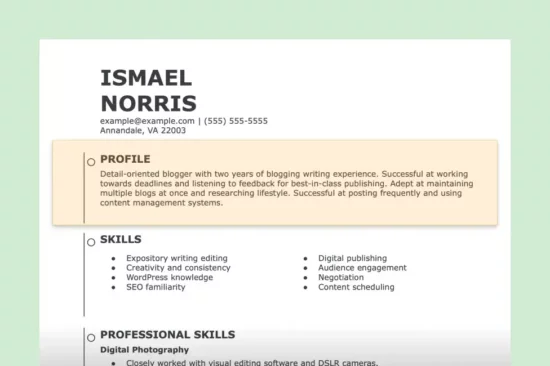
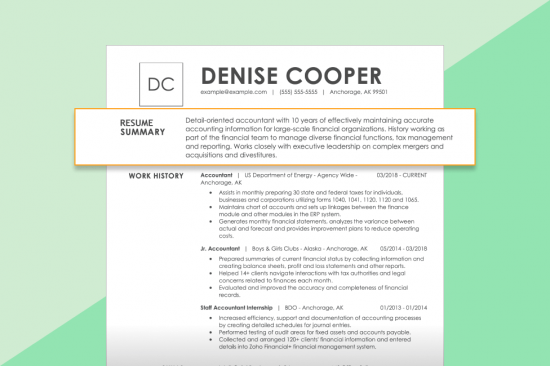
When you’re writing your resume, list your computer skills in the sections where they support your qualifications and match the job requirements. The most common places to highlight computer skills are your professional summary, skills section, and work experience section. See the following example:
Feature Computer Skills in Your Resume Summary
Your professional summary should highlight your most relevant computer skills when they’re important to the role you’re targeting.
Including specific software, platforms, or technical abilities near the top of your resume can quickly show employers that you have experience with the tools they need.
Prioritize skills that are directly mentioned in the job description and connect them to your experience or accomplishments.
Here’s an example of a resume summary featuring computer skills:
Data-driven marketing specialist with 5+ years of experience developing digital campaigns, analyzing performance metrics, and optimizing customer engagement strategies. Skilled in Google Analytics, HubSpot, Salesforce CRM, and social media management platforms for tracking campaign results, automating workflows, and improving marketing performance. Increased organic website traffic by 35% and improved email campaign conversion rates by 20% through data-driven optimization and targeted audience strategies.
Include Computer Skills in Your Skills Section
Your skills section is one of the most direct places to list computer skills on a resume. Use this section to highlight relevant software, platforms, programming languages, and technical tools that match the position. Organize your skills clearly by grouping similar tools, and avoid including outdated software or skills you have limited experience using.
Avoid listing every computer skill you have. Focus on the tools and technologies that are most relevant to the position, and prioritize those mentioned in the job description.
When choosing which computer skills to include, prioritize the technologies listed in the job description and use the same terminology when it accurately reflects your experience. This demonstrates alignment with the role and makes it easier for employers to spot your skills.
Here’s an example of a skills section that includes computer skills:
Skills
Microsoft Excel
Salesforce CRM
Google Analytics
HubSpot
Tableau
Microsoft Power BI
Highlight Computer Skills in Your Work Experience Section
The work experience section is where you can show how you applied your computer skills in a professional setting. Instead of only listing tools, explain how you used technology to complete tasks, solve problems, or achieve measurable results. Strong bullet points connect the software or platform you used with the impact of your work.
Use action verbs, such as “analyzed,” “created,” “managed,” “automated,” or “implemented,” to describe how you used computer skills. Whenever possible, include specific outcomes, such as improving efficiency, increasing revenue, reducing errors, or saving time.
Here’s an example of a work history section that highlights computer skills:
Work Experience
Digital Marketing Specialist BrightWave Solutions | March 2023–Present
Analyze performance data using Google Analytics and Looker Studio to identify traffic trends and develop strategies that have increased organic website traffic by 25%.
Manage email marketing campaigns through HubSpot, creating automated workflows and audience segments that improve customer engagement and conversion rates.
Develop performance reports using Microsoft Excel and Power BI to evaluate campaign results and provide data-driven recommendations to marketing leadership.
Tailor Your Computer Skills to the Job Description
The most effective computer skills to include on a resume are the ones that match the employer’s requirements. Review the job description for specific software, platforms, and technical skills, then incorporate relevant keywords throughout your resume where they naturally fit. Focus on showing how you’ve used each tool to complete tasks, solve problems, or achieve results.
Using keywords from the job description can also help make your resume more ATS-friendly. Many applicant tracking systems scan resumes for relevant skills and qualifications, so including the exact names of tools, platforms, and technologies you’re proficient in can improve the chances that your resume is recognized as a match.
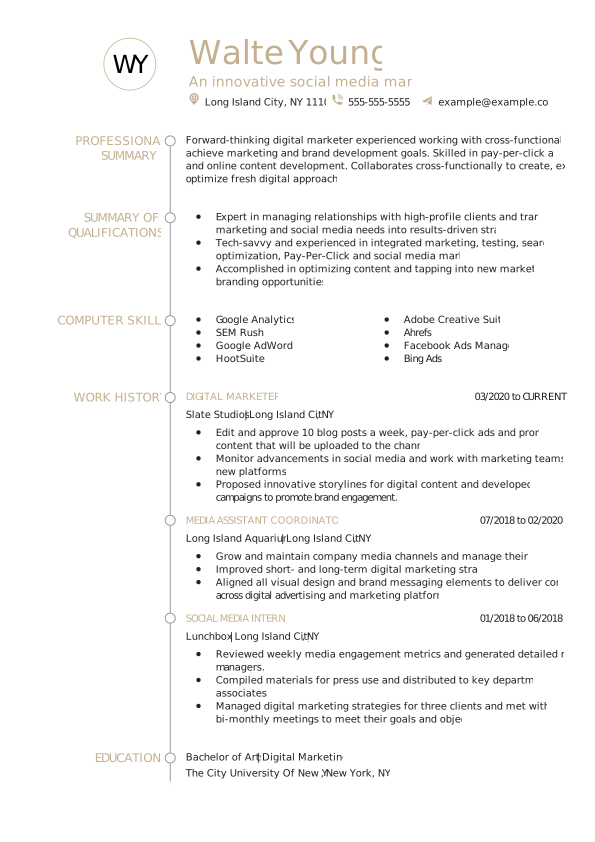
Example Resume With Computer Skills
The example below demonstrates how to incorporate computer skills naturally throughout a resume while tailoring them to a specific role.
Explore our full library of professional resume examples to see more sample skills sections tailored to various industries, roles, and experience levels.
How to Show Computer Skill Level on a Resume
Showing your computer skill level on a resume can help employers understand your experience with specific tools and technologies. Instead of simply labeling yourself as a beginner or expert, demonstrate your proficiency by explaining how you used a computer skill, what tasks you completed, and the results you achieved.
Beginner Computer Skills
Beginner computer skills demonstrate a basic understanding of common software, digital tools, and computer systems. These skills are often used for everyday workplace tasks, such as creating documents, managing email, organizing files, and entering data.
Here are examples of how to describe beginner computer skills on a resume:
Created, formatted, edited, and shared documents using Google Docs.
Developed and maintained inventory spreadsheets using Microsoft Excel.
Managed and responded to 40+ customer emails per week.
Organized schedules, meetings, and appointments using Google Calendar.
Intermediate Computer Skills
Intermediate computer skills involve using specialized software and completing more complex tasks, such as analyzing data, managing projects, creating digital content, or using industry-specific platforms.
Here are examples of how to describe intermediate computer skills on a resume:
Edited and enhanced digital images using Adobe Photoshop for marketing campaigns.
Created and delivered PowerPoint presentations for 50+ company stakeholders.
Created, assigned, and managed 150+ Jira tickets per month to support project workflows.
Analyzed website performance data using Ahrefs to identify SEO opportunities.
Advanced Computer Skills
Advanced computer skills demonstrate a high level of technical expertise with complex systems, programming languages, cybersecurity tools, or software development platforms. These skills typically require extensive training and hands-on experience.
Here are examples of how to describe advanced computer skills on a resume:
Developed and optimized a company website, increasing monthly users to over 3,000.
Identified and resolved cybersecurity vulnerabilities affecting a network with 100+ users.
Managed Agile development projects using Scrum methodologies for distributed teams.
Tested and debugged code to launch four new software products.
Pro Tip
Showing your abilities through work accomplishments is more effective than using labels like “beginner,” “intermediate,” or “advanced.” Skill bars and ratings may look visually appealing, but they can be difficult for ATS to read and don’t provide evidence of your experience.
How to Improve Your Computer Skills
You can improve your computer skills by practicing with commonly used software, taking online courses, earning certifications, and applying new skills in real-world projects. Continuously developing your technical abilities can make you more competitive in the job market and help you qualify for a wider range of roles.
Learn the Skills Employers Are Looking For
Start by reviewing job postings in your field to identify the software, platforms, and technologies employers most often request. Focus on learning the computer skills that appear repeatedly, especially those required for the roles you're interested in.
Take Online Courses
Online courses provide a structured way to learn new computer skills at your own pace. Many courses include hands-on exercises and projects that help you gain practical experience with popular software and technical tools.
Earn Industry-Recognized Certifications
Certifications can demonstrate your proficiency with specific software, platforms, or technical skills. While they're not required for every role, certifications can strengthen your resume, especially if you're changing careers or applying for technical positions.
Practice Through Real-World Projects
The best way to build computer skills is by using them regularly. Practice creating spreadsheets, designing presentations, building websites, analyzing datasets, or managing projects to develop confidence and hands-on experience. Personal projects, freelance work, volunteer opportunities, and internships can all help you apply new skills.
Stay Current With New Technology
Technology changes quickly, so regularly updating your skills can help you remain competitive. Follow industry trends, explore new software releases, and familiarize yourself with emerging technologies like AI, automation tools, and cloud platforms to keep your knowledge current.
Key Takeaways
Here are key takeaways to keep in mind as you add computer skills to your resume:
Computer skills are the technical abilities you use to operate computers, software, hardware, and digital tools in the workplace.
Tailor your computer skills to each job you apply for by prioritizing the software, platforms, and technologies listed in the job description.
Include computer skills throughout your resume—not just in your skills section. Feature them in your professional summary, work experience, and skills section.
Show your proficiency through measurable accomplishments instead of simply listing software names or assigning yourself skill ratings.
Focus on current, job-relevant tools and remove outdated software or technologies from your resume if they no longer add value.
Continue developing your computer skills through hands-on practice, online courses, certifications, and real-world projects to stay competitive in the job market.
Frequently Asked Questions
What computer skills should I include on my resume?
The computer skills you should list on your resume are those that are most relevant to the job you're applying for. Prioritize software, platforms, and technical tools mentioned in the job description, such as Microsoft Excel, Google Workspace, Salesforce, or Adobe Creative Cloud.
Include only skills you can confidently use, and support them with examples in your work experience whenever possible.
How do you list basic computer skills on a resume?
Basic computer skills should be listed in your resume's skills section and reinforced with examples in your work experience. Include foundational skills, such as Microsoft Office, Google Workspace, email, file management, data entry, and web browsing, if they're relevant to the role.
When possible, describe how you used these skills to complete tasks or improve efficiency.
What are examples of technical computer skills?
Technical computer skills include specialized software, programming languages, and digital tools used to perform job-specific tasks. If you're considering technical computer skills for a resume, examples include Microsoft Excel, SQL, Python, Java, Salesforce, Tableau, Adobe Photoshop, AutoCAD, AWS, and Google Analytics.
Whenever possible, support these skills with examples in your work history to show how you've used them to achieve results.
Is Microsoft Office still a good computer skill to list on a resume?
Yes, Microsoft Office is still a good computer skill to list on a resume, especially if it's relevant to the job you're applying for. Instead of listing "Microsoft Office" as a single skill, specify the applications you're proficient in, such as Microsoft Excel, Word, PowerPoint, or Outlook.
Highlighting individual programs gives employers a clearer understanding of your technical abilities and can help your resume align with ATS keyword searches.
Should I also list computer skills in my cover letter?
Yes, you can list computer skills in your cover letter when they’re relevant to the position and help demonstrate your qualifications.
Rather than repeating your resume, use your cover letter to explain how you applied specific tools or technologies to solve problems, improve processes, or achieve results. For example, mention how your experience with Excel, Salesforce, or project management software helped you contribute to a team or complete a project successfully.
How do I discuss computer skills during a job interview?
When discussing computer skills during a job interview, focus on how you’ve used specific tools to complete tasks, solve problems, or improve results. Instead of simply saying you’re proficient in a program, share examples of projects or accomplishments that demonstrate your experience.
Be prepared to explain your skill level, describe your typical workflow, and discuss how you’ve learned new technologies when needed.
Over the past 15 years, we’ve helped more than 10 million job seekers build stronger cover letters, discover their career paths, interview confidently, and boost their chances of finding the right job faster. Review our Editorial Policy to learn more about our process.
Eric is a Certified Professional Resume Writer (CPRW) and member of the Professional Association of Resume Writers & Career Coaches. He focused on helping job seekers improve their professional resumes to highlight their unique skills and experience. Eric holds a BA double major in creative writing and philosophy from Tulane University and brought more than five years of specialized experience to helping candidates navigate the complexities of the online job market, with a strong focus on resume optimization and effective self-presentation. His work has been featured on LiveCareer's Resume Builder, and his career background includes fields as diverse as education, hospitality, journalism, copywriting, and tech.




 Add LiveCareer as a preferred source on Google